Text ratio allows you to enter the value of text columns from Data inside the Table.
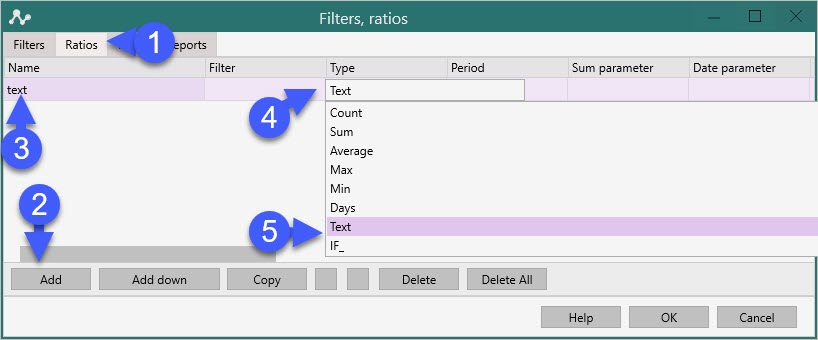
We enter the "Filters, ratios" functionality with the "Filter" button.
Enter the Ratio Name,
Type - Text
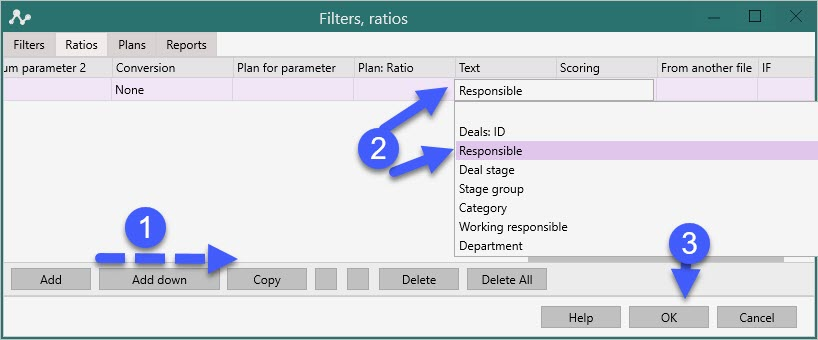
In the "Text" column - the section that must be displayed in the table, for example, Responsible.
Click "Ok".
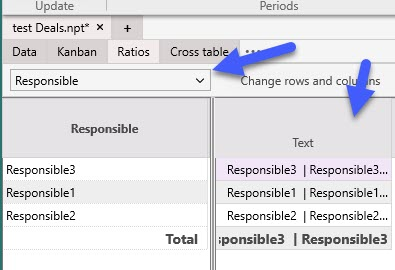
Select the "Ratio" tab.
In the "Text" column, see the list of values from the "Responsible" column that correspond to the aspect in the column on the left.
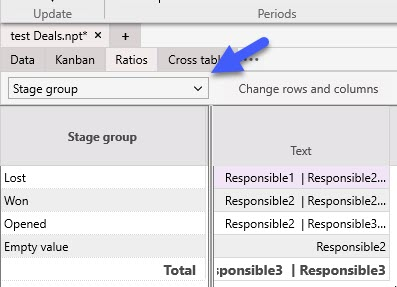
Change the section and see what values are included in the specified sections.
You can also enter here "Deal Name", "Responsible" or any custom fields, for example, by day.
You can enter all the values, and you get a simplified "Deal card".
Thanks to the capabilities of SQL, you can add any data to such an “entity card” and then export it to Excel in any aspect (for example, by employees and days of the week).